Free shipping on orders over €65*

Acer Iconia W4-820 Battery Replacement

  1. Acer Iconia W4-820 Battery Replacement, Flip tablet upside down: step 1, image 1 of 1
    • Flip the tablet over so that the screen is facing down

  2. Acer Iconia W4-820 Battery Replacement, Remove back cover: step 2, image 1 of 1
    Tool used on this step:
    Plastic Cards
    €2.95
    Buy
    • Use a plastic card or guitar pick to remove the back panel

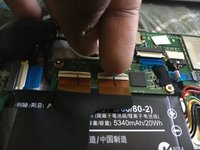
  3. Acer Iconia W4-820 Battery Replacement, Remove LCD connector: step 3, image 1 of 2 Acer Iconia W4-820 Battery Replacement, Remove LCD connector: step 3, image 2 of 2
    • Use your finger, spudger, guitar pick, or card

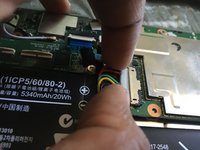
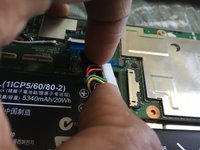
  4. Acer Iconia W4-820 Battery Replacement, Remove Battery connector: step 4, image 1 of 2 Acer Iconia W4-820 Battery Replacement, Remove Battery connector: step 4, image 2 of 2
    • Use the same tools as before to remove the connector

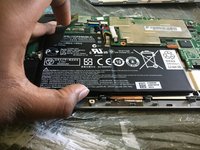
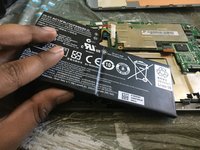
  5. Acer Iconia W4-820 Battery Replacement, Remove battery: step 5, image 1 of 2 Acer Iconia W4-820 Battery Replacement, Remove battery: step 5, image 2 of 2
    • Gently remove battery as there is adhesive on the back

Conclusion

To reassemble your device, follow these instructions in reverse order.

TechVid

Member since: 07/13/19

830 Reputation

4 Guides authored

0 Guide Comments

Add Comment

View Statistics:

Past 24 Hours: 3

Past 7 Days: 9

Past 30 Days: 29

All Time: 1,111