Introduction
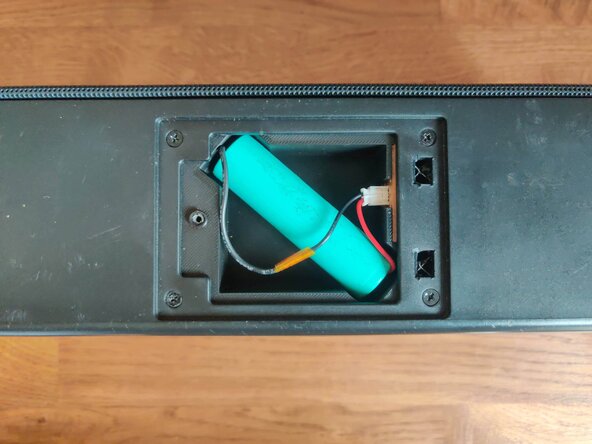
This tutorial is made to show you how to disassemble your Philips BT 3080 bluetooth speaker, remove the rectangular shaped battery, and replace it with a circular 18650 cell.
I discovered recently that this speaker has also a version with AA batteries. I do not know if this tutorial applies to this model.
For the Li-Ion battery replacement, there is no electronic modification.
What you need
-
-
This is the Philips BT3080B Bluetooth Speaker.
-
The top of the device hosts the different buttons used to control it.
-
On the bottom we have the battery compartment.
-
On the back there is a headphone jack and the USB charging port.
-
-
-
On the bottom of the device, start by removing the screw that is hidden underneath the sticker.
-
Remove the lid, and you should see a rectangular battery. You can unplug it and remove it.
-
-
-
On the bottom of the device, insert a spludger between the front cover and the bottom plastic housing.
-
Move from one edge to the other, do not insert your spludger too far, as there are plastic tabs that you will bump on.
-
Lift gently your spludger to avoid deforming the cover.
-
3 tabs are maintaining the front cover.
-
-
-
Moving to the top of the device, insert a mediator between the top cover and the back plastic housing.
-
Same as before, lift it gently to avoid deforming the cover.
-
3 tabs are maintaining the top cover.
-
-
-
The top cover is still cliped on the front edge.
-
Gently insert a spludger on the edge to lift the top cover.
-
With the spludger inserted, insert a mediator between the cover and the buttons panel.
-
3 more tabs later, the panel should come right off.
-
-
-
-
Tilt the front part.
-
Alternatively, you could probably remove the 2 screws to avoid putting stress on the cables.
-
Your speaker should be opened.
-
-
-
Unscrew the 4 philips screws that maintain the battery compartment.
-
Keep these screws as they will be used later to fix the new compartment.
-
Remove the compartement by sliding it towards the speakers.
-
-
-
Unscrew the 2 philips head to remove the battery connector from the compartment.
-
-
-
3D print this part (available at https://www.thingiverse.com/thing:717819...). The design provided have been modified to avoid cuts that you see here. This was an early prototype.
-
Slide the connector you unscrewed from the previous step in the opening, by putting the mainboard connector first.
-
-
-
Slide the 3D printed compartement in the speaker.
-
Put back the 4 philips screws you got from step 9.
-
-
-
Plug back the battery connector on the mainboard.
-
-
-
Put back the front part (this picture is with the hold compartment).
-
The four tubes that maintain the screws might collide with the rest of the speaker. Do not hesitate to put a bit or strength here. Keep in mind the wires from the microphone and diodes that are at the front.
-
Put back the 8 philips head screws from step 6.
-
While you are here, verify that all the screws are tightened (also on the buttons panel).
-
-
-
Put back the cover.
-
First, clip the top part around the buttons panel.
-
Then clip the front part at the bottom of the speaker.
-
-
-
Solder the connector of the old battery to a 18650 cell.
-
Plug in the battery.
-
Screw back the battery panel.
-
-
-
Make sure that the speaker can still turn on (if it does not, make sure that all the connectors you can see in the previous steps are plugged in ).
-
Also, check the 18650 cell voltage.
-
If it does, congratulations, you have a speaker with an easy to find battery !
-