Free shipping on orders over €65*

GameSir G8 Galileo USB-C Port Replacement

What you need

  1. GameSir G8 Galileo USB-C Port Replacement, motherboard: step 1, image 1 of 3 GameSir G8 Galileo USB-C Port Replacement, motherboard: step 1, image 2 of 3 GameSir G8 Galileo USB-C Port Replacement, motherboard: step 1, image 3 of 3
    • Use a hair dryer or heat gun on the low setting to gently warm the center grip pad to soften the adhesive underneath.

    • Place the nozzle 2–3 inches above the device and keep moving it in small circles until the surface is warm and the adhesive has loosened.

    • Don't leave the nozzle in one place for two long or you risk damage to the controller.

  2. GameSir G8 Galileo USB-C Port Replacement: step 2, image 1 of 3 GameSir G8 Galileo USB-C Port Replacement: step 2, image 2 of 3 GameSir G8 Galileo USB-C Port Replacement: step 2, image 3 of 3
    • Insert the plastic opening tool into the edge of the center grip pad.

    • Once the edge is free, use your fingers to peel off the grip pad.

  3. GameSir G8 Galileo USB-C Port Replacement: step 3, image 1 of 3 GameSir G8 Galileo USB-C Port Replacement: step 3, image 2 of 3 GameSir G8 Galileo USB-C Port Replacement: step 3, image 3 of 3
    • Use a Phillips #0 screwdriver to remove the three screws from the center front panel.

  4. GameSir G8 Galileo USB-C Port Replacement: step 4, image 1 of 3 GameSir G8 Galileo USB-C Port Replacement: step 4, image 2 of 3 GameSir G8 Galileo USB-C Port Replacement: step 4, image 3 of 3
    • Remove the plastic cover from both sides of the controller with your hand.

    • They’re held in place by magnets and should pop off easily.

  5. GameSir G8 Galileo USB-C Port Replacement: step 5, image 1 of 3 GameSir G8 Galileo USB-C Port Replacement: step 5, image 2 of 3 GameSir G8 Galileo USB-C Port Replacement: step 5, image 3 of 3
    • Remove the two Phillips #0 screws from the right side.

  6. GameSir G8 Galileo USB-C Port Replacement: step 6, image 1 of 3 GameSir G8 Galileo USB-C Port Replacement: step 6, image 2 of 3 GameSir G8 Galileo USB-C Port Replacement: step 6, image 3 of 3
    • Turn the controller around and remove the rear housing.

    • The rear housing covers only the back of the center section and the right grip. The back cover of the left grip remains attached to the controller.

  7. GameSir G8 Galileo USB-C Port Replacement: step 7, image 1 of 3 GameSir G8 Galileo USB-C Port Replacement: step 7, image 2 of 3 GameSir G8 Galileo USB-C Port Replacement: step 7, image 3 of 3
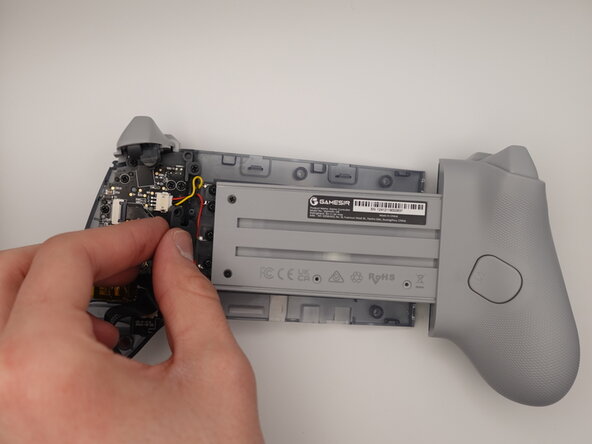
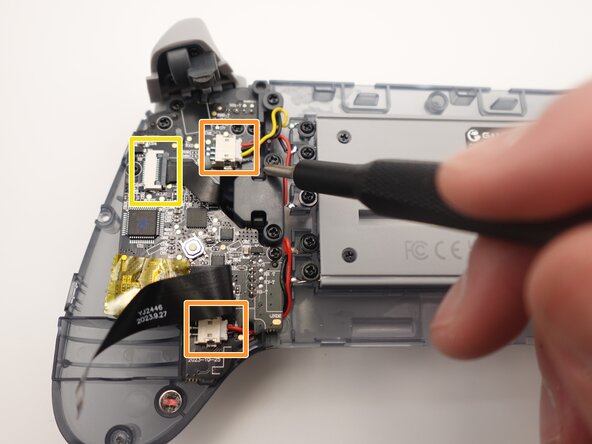
    • Remove nine screws from the motherboard using a Phillips #0 screwdriver.

    • Squeeze the edges of the connector and pull it gently from its socket on the board.

    • Use a spudger or a clean fingernail to flip up the black locking flap—this is the unlocked position.

    • Use the widest tool possible to avoid damaging the delicate hinge pins.

    • Use tweezers or your fingers to gently pull the cable from its socket.

  8. GameSir G8 Galileo USB-C Port Replacement: step 8, image 1 of 2 GameSir G8 Galileo USB-C Port Replacement: step 8, image 2 of 2
    • Remove the motherboard.

  9. GameSir G8 Galileo USB-C Port Replacement, USB-C Port: step 9, image 1 of 1
    • Pull USB-C port from the center section.

  10. GameSir G8 Galileo USB-C Port Replacement: step 10, image 1 of 3 GameSir G8 Galileo USB-C Port Replacement: step 10, image 2 of 3 GameSir G8 Galileo USB-C Port Replacement: step 10, image 3 of 3
    • Remove the USB-C from the controller.

Conclusion

To reassemble your device, follow these instructions in reverse order. Take your e-waste to an R2 or e-Stewards certified recycler.

One other person completed this guide.

Liczi Padilla

Member since: 10/14/25

339 Reputation

2 Guides authored

Team

UMass Dartmouth, Team 2-2, Bowman Fall 2025 Member of UMass Dartmouth, Team 2-2, Bowman Fall 2025

UMASSD-BOWMAN-F25S2G2

4 Members

5 Guides authored

1 Guide Comment

Where can I purchase the USB Type-C port for this controller?

Pavel Mirchev - Reply Share
Add Comment

View Statistics:

Past 24 Hours: 11

Past 7 Days: 66

Past 30 Days: 187

All Time: 613