Free shipping on orders over €65*

How to Fix the Scroll Wheel on a Keychron M1 Mouse

What you need

  1. How to Fix the Scroll Wheel on a Keychron M1 Mouse, How to Fix the Scroll Wheel on a Keychron M1 Mouse: step 1, image 1 of 3 How to Fix the Scroll Wheel on a Keychron M1 Mouse, How to Fix the Scroll Wheel on a Keychron M1 Mouse: step 1, image 2 of 3 How to Fix the Scroll Wheel on a Keychron M1 Mouse, How to Fix the Scroll Wheel on a Keychron M1 Mouse: step 1, image 3 of 3
    • Use a spudger or your fingernail to peel the mouse feet from the bottom of the mouse to reveal two screws.

    • Save the screw cover, as it can be used again during reassembly.

    • Use a JIS #0 screwdriver to remove the two 6.0 mm screws from the bottom of the mouse.

  2. How to Fix the Scroll Wheel on a Keychron M1 Mouse: step 2, image 1 of 3 How to Fix the Scroll Wheel on a Keychron M1 Mouse: step 2, image 2 of 3 How to Fix the Scroll Wheel on a Keychron M1 Mouse: step 2, image 3 of 3
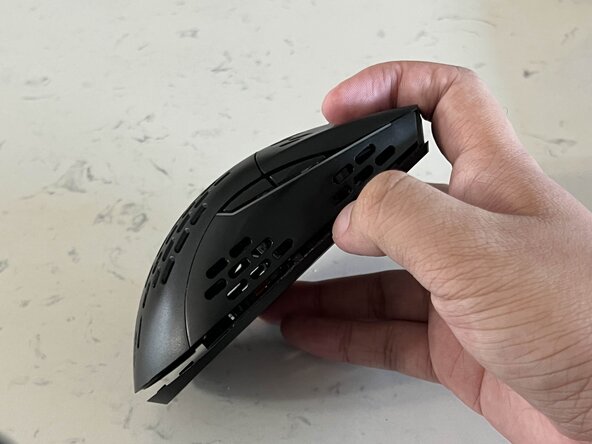
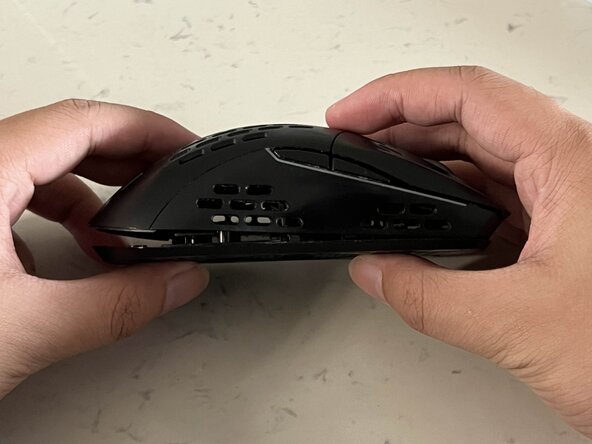
    • Insert the spudger into the seam at the back of the mouse, between the top and bottom case, to release the clips holding the bottom cover.

    • Start from the back, and slide the spudger to the middle until you reach the front.

    • Lift the top until you can see the cables connecting the top and bottom case.

    • Be very gentle when detaching the top and bottom parts of the mouse, and don't pull them apart.

  3. How to Fix the Scroll Wheel on a Keychron M1 Mouse: step 3, image 1 of 3 How to Fix the Scroll Wheel on a Keychron M1 Mouse: step 3, image 2 of 3 How to Fix the Scroll Wheel on a Keychron M1 Mouse: step 3, image 3 of 3
    • Use the tip of the spudger to push the black plastic locking tab away from the socket—it should only move about 1–2 mm.

    • When the locking tabs are open, they are in the unlock position.

    • Use tweezers to slide all three ribbon cables from their connector on the motherboard.

  4. How to Fix the Scroll Wheel on a Keychron M1 Mouse: step 4, image 1 of 3 How to Fix the Scroll Wheel on a Keychron M1 Mouse: step 4, image 2 of 3 How to Fix the Scroll Wheel on a Keychron M1 Mouse: step 4, image 3 of 3
    • Use a JIS #0 screwdriver to remove two screws from the PCB:

    • One 5.0 mm-long screw

    • One 6.0 mm-long screw

  5. How to Fix the Scroll Wheel on a Keychron M1 Mouse: step 5, image 1 of 3 How to Fix the Scroll Wheel on a Keychron M1 Mouse: step 5, image 2 of 3 How to Fix the Scroll Wheel on a Keychron M1 Mouse: step 5, image 3 of 3
    • Gently pull the retaining clips back with a spudger or your fingers to release the PCB.

    • Remove the PCB from the bottom case.

  6. How to Fix the Scroll Wheel on a Keychron M1 Mouse: step 6, image 1 of 3 How to Fix the Scroll Wheel on a Keychron M1 Mouse: step 6, image 2 of 3 How to Fix the Scroll Wheel on a Keychron M1 Mouse: step 6, image 3 of 3
    • Use a cotton swab and Isopropyl alcohol, and gently clean both the wheel brackets and the scroll wheel itself.

    • Use a plastic-safe PTFE spray to lubricate the mouse and wheel brackets.

  7. How to Fix the Scroll Wheel on a Keychron M1 Mouse: step 7, image 1 of 3 How to Fix the Scroll Wheel on a Keychron M1 Mouse: step 7, image 2 of 3 How to Fix the Scroll Wheel on a Keychron M1 Mouse: step 7, image 3 of 3
    • Gently place the PCB back onto the bottom of the mouse until you hear both latches click into place.

    • That ensures it's in the proper position and will not fall out when reassembling your mouse.

    • Replace the 5.00 mm JIS #J0 screw.

    • Replace the 6.00 mm JIS #J0 screw.

  8. How to Fix the Scroll Wheel on a Keychron M1 Mouse: step 8, image 1 of 3 How to Fix the Scroll Wheel on a Keychron M1 Mouse: step 8, image 2 of 3 How to Fix the Scroll Wheel on a Keychron M1 Mouse: step 8, image 3 of 3
    • When inserting the ribbon cables into their sockets, ensure they are placed correctly and not backwards or in the wrong sockets.

    • Fully insert each cable into its socket under the locking tab.

    • Use a spudger or clean fingernail to push in the locking tab, securing each cable.

  9. How to Fix the Scroll Wheel on a Keychron M1 Mouse: step 9, image 1 of 3 How to Fix the Scroll Wheel on a Keychron M1 Mouse: step 9, image 2 of 3 How to Fix the Scroll Wheel on a Keychron M1 Mouse: step 9, image 3 of 3
    • Before closing the mouse, you can plug it into a charging cable to test whether the RGB lights in the mouse are functional. If they turn on, this means the reassembly process has been successful.

    • Align the top and bottom casing.

    • Start at the front of the mouse and press the top and bottom together until you hear a click. After the front has been secured, move to the middle, then the back.

    • Use a JIS #0 screwdriver to secure the two 6.0 mm screws on the bottom of the mouse and replace the screw cover.

    • Your mouse should be back together and working!

Conclusion

To reassemble your device, follow these instructions in reverse order.

James Manlapaz

Member since: 09/25/25

169 Reputation

1 Guide authored

Team

0 Guide Comments

Add Comment

View Statistics:

Past 24 Hours: 1

Past 7 Days: 18

Past 30 Days: 59

All Time: 311