Free shipping on orders over €65*

Microsoft LXM-00001 Printed Circuit Board (PCB) Replacement

What you need

  1. Microsoft LXM-00001 Printed Circuit Board (PCB) Replacement, Rubber Feet: step 1, image 1 of 3 Microsoft LXM-00001 Printed Circuit Board (PCB) Replacement, Rubber Feet: step 1, image 2 of 3 Microsoft LXM-00001 Printed Circuit Board (PCB) Replacement, Rubber Feet: step 1, image 3 of 3
    • Turn the keyboard face down.

  2. Microsoft LXM-00001 Printed Circuit Board (PCB) Replacement: step 2, image 1 of 3 Microsoft LXM-00001 Printed Circuit Board (PCB) Replacement: step 2, image 2 of 3 Microsoft LXM-00001 Printed Circuit Board (PCB) Replacement: step 2, image 3 of 3
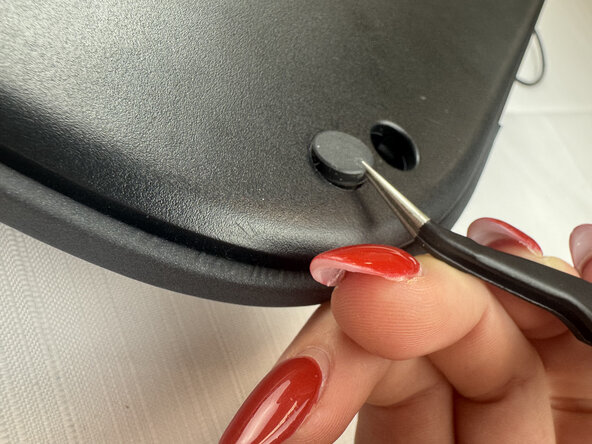
    • Slide the curved tweezers under the edge of one of the rubber feet.

    • Gently lift straight up, removing the rubber foot.

    • Repeat on the remaining rubber feet.

  3. Microsoft LXM-00001 Printed Circuit Board (PCB) Replacement, Printed Circuit Board (PCB): step 3, image 1 of 3 Microsoft LXM-00001 Printed Circuit Board (PCB) Replacement, Printed Circuit Board (PCB): step 3, image 2 of 3 Microsoft LXM-00001 Printed Circuit Board (PCB) Replacement, Printed Circuit Board (PCB): step 3, image 3 of 3
    • Remove the five 6 mm screws beneath the rubber feet using a Phillips #2 screwdriver.

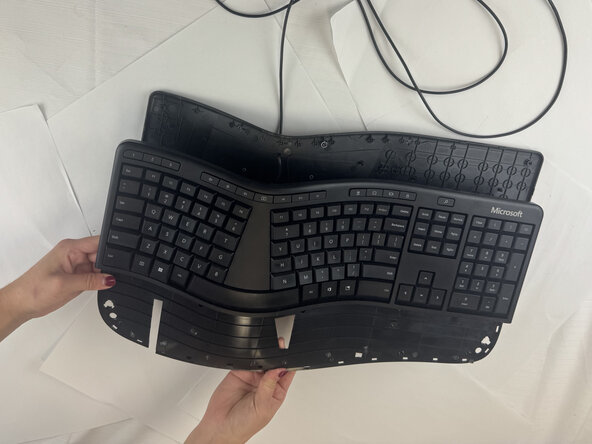
    • Using plastic spudgers, tweezers, pliers, and brute force, separate the front of the keyboard from the back of the keyboard.

    • Use caution as parts may fly off.

  4. Microsoft LXM-00001 Printed Circuit Board (PCB) Replacement: step 4, image 1 of 3 Microsoft LXM-00001 Printed Circuit Board (PCB) Replacement: step 4, image 2 of 3 Microsoft LXM-00001 Printed Circuit Board (PCB) Replacement: step 4, image 3 of 3
    • With tweezers or pliers, pry under the old printed circuit board.

    • Gently lift straight up.

  5. Microsoft LXM-00001 Printed Circuit Board (PCB) Replacement: step 5, image 1 of 1
    • Desolder the printed circuit board once it has been removed from the casing.

Conclusion

To reassemble your device, follow these instructions in reverse order.

Mary Green

Member since: 09/24/25

409 Reputation

4 Guides authored

Team

Texas Tech, Team 2-1, Johansen Fall 2025 Member of Texas Tech, Team 2-1, Johansen Fall 2025

TTU-JOHANSEN-F25S2G1

5 Members

4 Guides authored

0 Guide Comments

Add Comment

View Statistics:

Past 24 Hours: 0

Past 7 Days: 1

Past 30 Days: 4

All Time: 88