Free shipping on orders over €65*

Razer BlackWidow V3 Mechanical Gaming Keyboard Key Switch Replacement

What you need

  1. Razer BlackWidow V3 Mechanical Gaming Keyboard Key Switch Replacement, Key Switch: step 1, image 1 of 3 Razer BlackWidow V3 Mechanical Gaming Keyboard Key Switch Replacement, Key Switch: step 1, image 2 of 3 Razer BlackWidow V3 Mechanical Gaming Keyboard Key Switch Replacement, Key Switch: step 1, image 3 of 3
    • Use the keycap puller to grip the key firmly.

    • Pull straight up to remove the keycap.

    • Place the keycap somewhere you won’t lose it.

    • Do not twist the puller. Twisting can crack the keycap stem.

  2. Razer BlackWidow V3 Mechanical Gaming Keyboard Key Switch Replacement: step 2, image 1 of 1
    • Remove all screws from the keyboard frame.

    • Pry around the edges to release the plastic clips.

    • Do not force the clips. Excess pressure can snap the plastic.

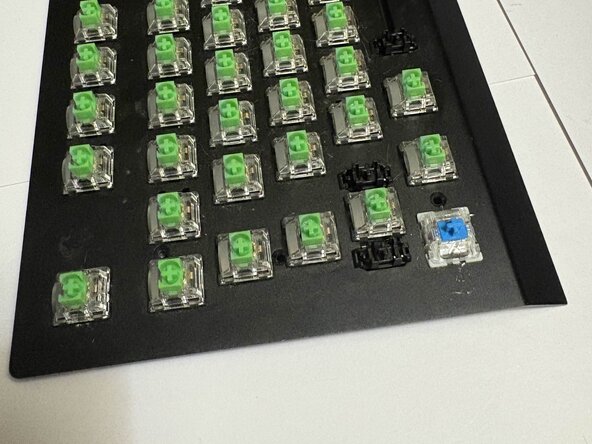
  3. Razer BlackWidow V3 Mechanical Gaming Keyboard Key Switch Replacement: step 3, image 1 of 1
    • Lift the top case to expose the PCB.

    • Position the keyboard so the PCB lies flat and stable.

  4. Razer BlackWidow V3 Mechanical Gaming Keyboard Key Switch Replacement: step 4, image 1 of 2 Razer BlackWidow V3 Mechanical Gaming Keyboard Key Switch Replacement: step 4, image 2 of 2
    • Apply heat for 2–3 seconds before using the solder sucker. Melt one pin at a time and suck up the solder.

    • Verify the pins are fully loose before pushing the switch out.

    • Remove the switch using the tool needed

    • Repeat for both pins until the switch lifts out of the board.

    • Caution: The soldering iron is extremely hot avoid touching the metal tip or nearby components. Do not leave the iron on one PCB pad for too long; overheating can lift pads or damage the traces.

    • Do NOT pull hard leftover solder can rip PCB pads.

  5. Razer BlackWidow V3 Mechanical Gaming Keyboard Key Switch Replacement: step 5, image 1 of 3 Razer BlackWidow V3 Mechanical Gaming Keyboard Key Switch Replacement: step 5, image 2 of 3 Razer BlackWidow V3 Mechanical Gaming Keyboard Key Switch Replacement: step 5, image 3 of 3
    • Insert the new switch into the plate so it sits flat and straight.

    • Use a small amount of solder on each pin just enough to form a solid joint.

    • Verify the switch is straight before soldering. Crooked switches may cause sticking or double presses.

  6. Razer BlackWidow V3 Mechanical Gaming Keyboard Key Switch Replacement: step 6, image 1 of 1
    • Close the keyboard case, reinstall all screws, and reattach the keycap. Once assembled, plug in the keyboard and test the switch to confirm it works correctly.

Conclusion

Your new switch should now be fully installed and functional. Before reassembling the keyboard, test the switch to ensure it registers correctly. Once confirmed, reassemble the keyboard by following the steps in reverse order.

Robert Bryan Moore

Member since: 10/09/25

135 Reputation

1 Guide authored

Team

0 Guide Comments

Add Comment

View Statistics:

Past 24 Hours: 8

Past 7 Days: 41

Past 30 Days: 165

All Time: 522