Free shipping on orders over €65*

Razer Wolverine Ultimate Analog Sticks Replacement

What you need

  1. Razer Wolverine Ultimate Analog Sticks Replacement, Back Panel: step 1, image 1 of 1
    • Place a Jimmy into the crevice between the front panel and one of the back grips, and gently pry the back grip off. Repeat for the other back grip.

    • You may damage the grip's rubber when doing this, but the damage is minimal and does not affect the effectiveness of this device.

  2. Razer Wolverine Ultimate Analog Sticks Replacement: step 2, image 1 of 2 Razer Wolverine Ultimate Analog Sticks Replacement: step 2, image 2 of 2
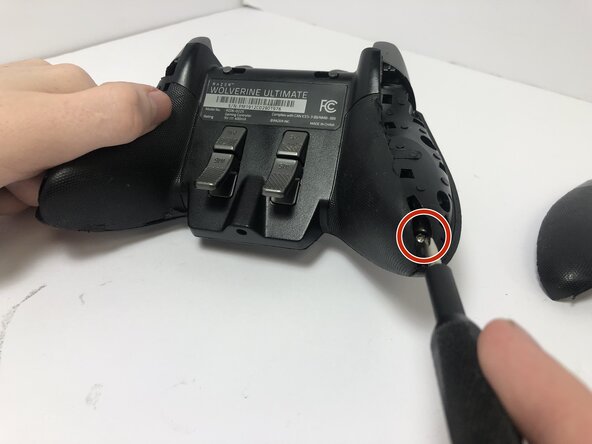
    • Remove two 2 mm screws on the back of each grip using a T5 Torx screwdriver.

  3. Razer Wolverine Ultimate Analog Sticks Replacement: step 3, image 1 of 3 Razer Wolverine Ultimate Analog Sticks Replacement: step 3, image 2 of 3 Razer Wolverine Ultimate Analog Sticks Replacement: step 3, image 3 of 3
    • Place a Jimmy into the crevice between the front and back panels and pry the back panel away.

  4. Razer Wolverine Ultimate Analog Sticks Replacement: step 4, image 1 of 1
    • Separate the top of the controller from the back, exposing the motherboard.

  5. Razer Wolverine Ultimate Analog Sticks Replacement, Analog Sticks: step 5, image 1 of 1
    • Detach the two white connectors from the motherboard.

  6. Razer Wolverine Ultimate Analog Sticks Replacement: step 6, image 1 of 1
    • Remove the two 4 mm screws from the motherboard using a Phillips #000 screwdriver.

  7. Razer Wolverine Ultimate Analog Sticks Replacement: step 7, image 1 of 1
    • Remove the two 2 mm screws from the back of the trigger mechanism using a Phillips #000 screwdriver.

  8. Razer Wolverine Ultimate Analog Sticks Replacement: step 8, image 1 of 1
    • Lift the motherboard up slowly to avoid damaging any inner components.

    • In the middle is a white ribbon of wires connecting the inside of the controller to the motherboard. Be careful not to detach or damage it by pulling too hard.

  9. Razer Wolverine Ultimate Analog Sticks Replacement: step 9, image 1 of 1
    • Carefully flip the motherboard upwards.

    • Carefully grip the analog sticks and lift them straight up to remove them.

Conclusion

To reassemble your device, follow these instructions in reverse order.

Cerena Jones

Member since: 09/09/25

171 Reputation

1 Guide authored

0 Guide Comments

Add Comment

View Statistics:

Past 24 Hours: 2

Past 7 Days: 8

Past 30 Days: 59

All Time: 267