Introduction
If you need to replace the joystick cover of your Turtle Beach Recon Cloud controller, follow this guide. You may need to replace a joystick cover if it is damaged or stuck and need to be cleaned.
Before you begin, power off and disconnect your controller from the charging cable.
What you need
-
-
-
Insert a spudger between the controller and the battery pack.
-
Use the spudger to loosen the battery from the motherboard.
-
Gently lift the battery pack until just out so as to not pull on the wire attached.
-
-
-
Use the point of a spudger to push on alternating sides of the battery connector to "walk" it out of its socket.
-
If that doesn't work, use a pair of tweezers to firmly grip the sides of the connector and pull straight away from the socket. Hold the tweezers closer to the connector to get a better grip.
-
-
-
Lift out the motherboard at an angle to detach it from the clips securing it to the case.
-
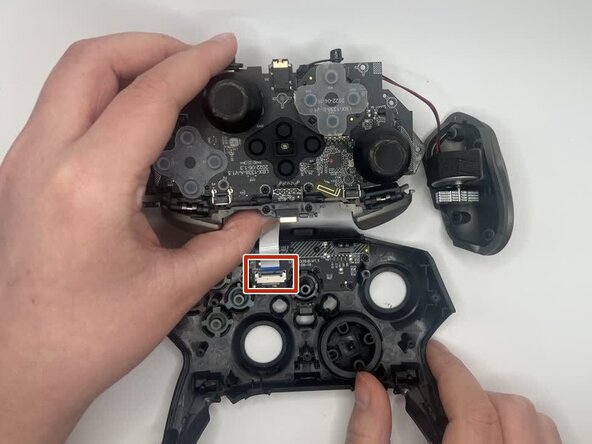
Use a spudger or a clean fingernail to flip up the locking flap of the ZIF connector—this is the unlocked position.
-
Use tweezers or your fingers to gently pull the cable out of its socket.
-




To reassemble your device, follow these instructions in reverse order. Take your e-waste to an R2 or e-Stewards certified recycler.

Team

University of North Texas, Team 1-5, Kilpatrick Fall 2025 Member of University of North Texas, Team 1-5, Kilpatrick Fall 2025
UNT-KILPATRICK-F25S1G5
3 Members
7 Guides authored
