Introduction
Remove or replace the pentalobe screws in an iPhone 7 Plus.
What you need
-
-
Power off your iPhone before beginning disassembly.
-
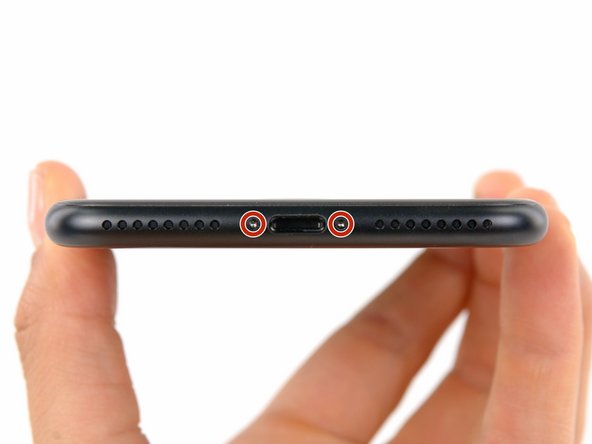
Remove the two 3.4 mm pentalobe screws at the bottom edge of the iPhone (using a P2 screw bit, if you have a set of bits).
-
-
To reassemble your device, follow these instructions in reverse order.
Cancel: I did not complete this guide.
34 other people completed this guide.

5 Guide Comments
Can anyone confirm 7/7P's pentalobe screws have a ring of seal near the screw head?
Hey Cooper,
There is no seal on the screw. The head of the screw simply pushes against the lip of the screw well, without using any sort of pneumatic seal, o-ring etc.
As Talon says, it is part of the casing.
as the costumer said, there is a sealant but not noticeable
how do i fix the charging port if the phone has been off for a while, 5 months to be exact and it refuses to charge
