
Free shipping on orders over €65*

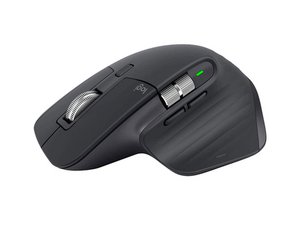
Repair and disassembly information for the Logitech MX Master 3 wireless mouse. Released in 2019 and identified by model numbers MR0077, 810-006815 (Europe), 910-005620, 910-005647, or 910-005692.

Why it’s continuously blinking in red

Hi my mice started to blink continuously in red I tried to charge it and I tested individually without the battery, so it’s no the battery, it’s look like a permanent dead or is having a short circuit

Answer this question I have this problem too

Is this a good question?

Score 5
4 Comments

Hi Antonio!. Did you find a solution? I have the same issue. Please let me know if you find a fix

by

Unfortunately no , even in instructables or Reddit I haven't had luck, maybe if I upload more images of each piece separately some one can help us

by

@antoniocardenas @nahuelpala58349 pictures will definitely help. I would have a look at the USB C port also. especially if the behavior is the same whether it's plugged in or not

by

I encounter the same problem too. I checked the battery, and it is fine. I don't know what's going on.

by

Add a comment

4 Answers

Most Helpful Answer

Logitech MX Master 3 Flashing Red Light Fix

https://youtu.be/Va4ISDpGLfw?si=jFvYHnbO...

Was this answer helpful?

Score 3
Add a comment

Best answer, don't buy logi any more. I have MX2 and MX3, I suspect the battery is fine in the MX3 as it works for literal weeks on the red light flashing randomly for days at a time, charge it, no difference.

Checking reddit, the popular theory is warranty burnout, so the solution is to stop buying these expensive devices that are on the whole no better than something half the price if you look around, and last exactly until warranty expires before starting to randomly play up, strangely enough.

Update (02/28/26)

Have not had an issue with this mouse since I removed the redundant and faulty thumb button.

https://www.youtube.com/watch?v=SWpbxmAN...

My mouse also had damage on the rubber over the button, so there is now a gaping hole that my thumb sits in, but the mouse works perfectly since I followed this video.

Before this fix, I had the red lights at random, and then the computer would start to lock up at random and not accept any mouse inputs at all.

Much searching led me to that video and removing that button completely fixed all issues with this mouse.

Thanks for the expensive garbage that breaks the whole mouse until removed, Logi, I will never buy your products again. When this mouse goes I'm on to another brand.
Was this answer helpful?

Score 2

1 Comment:

I have since ripped out the thumb button on this mouse because it was causing my computer to literally completely lock up when it faulted to always pressed at random.

In Summary, a button I never used in my life and was completely not needed caused this very expensive mouse to malfunction causing the whole computer to lock with no explanation for months and months.

There is now a hole where the useless and broken thumb button used to be, and I have not had freezes or red lights (apart from when it's time to charge) for about a year now. Take that button out (guides available online) and next time the mouse plays up, buy something for half of the price from someone, anyone else that works for longer than the warranty period before starting to play up.

I have a dead keyboard with a logi logo on it as well, barely out of warranty and only used for about 6 months because I didn't unbox it straight away. Useless company had nothing to say about it because it was more than 12 months old when it broke. Useless.

by

Add a comment

I have a Master 3S and after a year left click gone and I couldn't find proper switch to replace. Also after opening mouse, red flash light shows up and I don't known what to do. Warranty is ended and my mouse is dead. A well known brand like Logi should be responsible for this kind of malfunctioning.

Was this answer helpful?

Score 1
Add a comment

Hello

It could be:
1) dead battery/batteries
2) driver not installed
3) usb dongle wasn't recognize properly due to glitch
4) drive for dongle wasn't installed correctly or corrupted for usb port its in
5) dongle radio burnt out
6) mouse radio burnt out
7) you forgot to put usb dongle in usb port.

Try fresh batteries
Try plugging the dongle in another usb port
Try unistalling then reinstalling the driver
Try going in device manager, see if there are unloaded drivers and either remove devices then refresh list; or update drivers.

Was this answer helpful?

Score 0

3 Comments:

Hi and thanks for your reply the battery is a rechargeable one and is fine I tested with a multimeter , about the dongle and signal the mice is unrecognizable by any other device no matter if is on the channel one two or three other thing to take in consideration is the mice is fully cordless and the usb c port is just only for power

by

Same problem, LED (red) flashing endlessly. Contacted support to carry out some tests together, probably resulting in a faulty card. They suggest buying a new one as it is currently out of warranty. Thank you Logitech for providing me with an expensive mouse that lasted more than 2 years

by

You just don't understand what are you trying to write about

by

Add a comment

Add your answer

Antonio Cardenas will be eternally grateful.
View Statistics:

Past 24 Hours: 12

Past 7 Days: 56

Past 30 Days: 255

All Time: 9,917
