Free shipping on orders over €65*

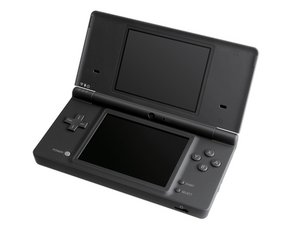
The Nintendo DSi is the third iteration in the Nintendo DS line, and made its debut in Japan in late 2008.

DSI flashing light, turns off when attempted to turn on

So I recently bought a new touchscreen and shoulder Button cable for my DSI and I didn't get to test them cause it wouldnt turn on. I figured I put the battery in backwards and I checked the fuses and the fuse on the button board seemed to be dead. So I ordered a replacement that just came. I installed it, the fuse looked good, and it still did the same thing. I have two batteries and they don't seem dead as the multimeter says one has ~3.8v and one has ~4.1 volts. I put it in a bunch for both, tried many things, took out and reattached screen and camera cords, and nothing seems to work. I need help with this please!!!

Answered! View the answer I have this problem too

Is this a good question?

Score 0
Add a comment

1 Answer

Chosen Solution

Hi!

I'm afraid that something is burned/died on the motherboard.

There is always a reason if a fuse dies on the board.

I'm afraid you need a new board in order to get it working again. You can check the old board, but I'm afraid it won't be easy to find the issue and the possibility that multiple components did die, is there.

I would replace the board in your case.

Guide: Nintendo DSi Motherboard Replacement

Sorry for the bad news...

Was this answer helpful?

Score 2

6 Comments:

thats sad to hear but how could it be dead if the fuse is good?

by

Hi!

Your fuses did die on the board right? So it most likely did had a "big" shock/hit that burned more then just the fuses. And that can cause a chain of reaction, causing multiple components that died :(...

by

WAIT i dont know what happened, i took just the motherboard and the buttton board/power board and just tried charging it again with the battery just for some last hope, and it charged??? i put everything back and its alive im not sure what was happening it could of been a ribbon cable but i dont think that would give a flashing orange light as i checked it several times thanks for the help though!

by

That is very strange. The power (red/black) cable wasn't properly seated is my next guess. Well glad that you were able to fix it! Could also still be related to the power board. If the issue occurs, try replacing the power board (it comes with new cables as well). Hopefully it will remain OK now. Glad that your motherboard is still OK!!

by

that's what I bought before maybe it was thought I double checked! thanks for giving me the info for the future thought!

by

Show 1 more comment

Add a comment

Add your answer

Avery Roberts will be eternally grateful.
View Statistics:

Past 24 Hours: 2

Past 7 Days: 47

Past 30 Days: 47

All Time: 47
